The best student planner apps in 2026
The best apps for planning your semester in 2026, compared: MyStudyLife, Soma, Shovel, Power Planner, Notion, Motion, Reclaim and Google Calendar.
Most "best of" lists are the same five apps in a different order. This one is short and practical: what each app is good at, and where it falls short.
What makes a good academic planner?
A to-do list isn't a study plan. The apps that help over a whole semester:
- Collect your deadlines, ideally straight from Canvas
- Turn due dates into work time around your real week
- Adjust when plans change
- Show you where your time went
At a glance
| App | Best for | Pulls from Canvas | Price |
|---|---|---|---|
| MyStudyLife | A free all-round school planner | Yes | Free for students |
| Soma | All your courses in one plan that adapts to you | Yes | Free; monthly or semester upgrade |
| Shovel | Planning when to do the work | Yes | Paid, after a 7-day trial |
| Power Planner | Grades and GPA on a budget | No | Free; one-time upgrade |
| Notion | Building your own system | No | Free for college students |
| Motion | Hands-off AI scheduling | No | Paid; priced for professionals |
| Reclaim.ai | Protecting study time on your calendar | No | Free plan; paid from about $10/mo |
| Google Calendar | A free baseline | Via calendar feed | Free |
1. MyStudyLife: best free all-round planner
A long-running planner built around how school works: class timetables (rotating schedules too), homework, exams and reminders on web, iPhone and Android. It syncs calendars from Canvas and Blackboard, and now has AI help for planning your week.
Good for: anyone who wants a solid planner for free.
Less good for: turning deadlines into a detailed day-by-day schedule.
2. Soma: best for bringing everything together
Used by students at Stanford, Cornell, UC Berkeley, Emory and more, Soma brings your whole semester together: Canvas and Gradescope assignments, syllabus dates, course files, grades and Google Calendar, all in one plan.
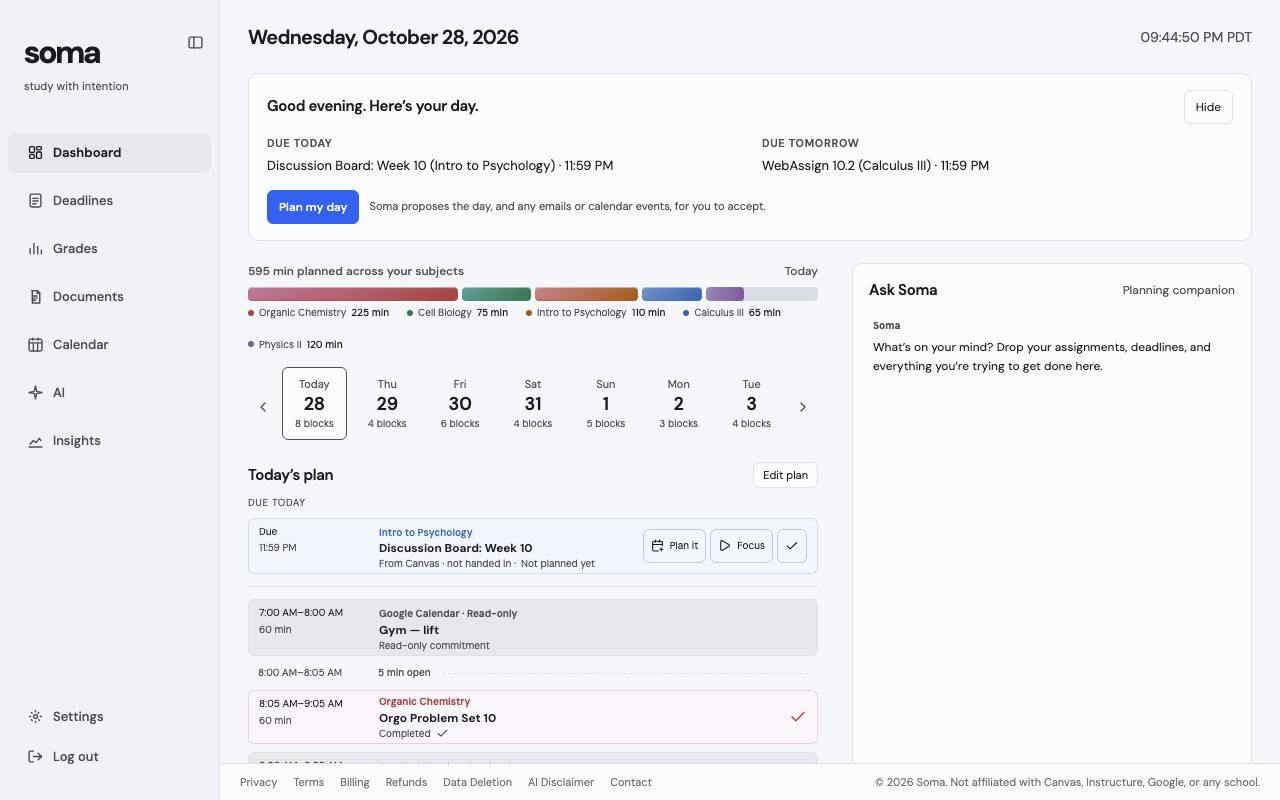
And that plan adapts to you. Soma learns from every focus session how long your work really takes, and its calendar shows exactly where your hours went.
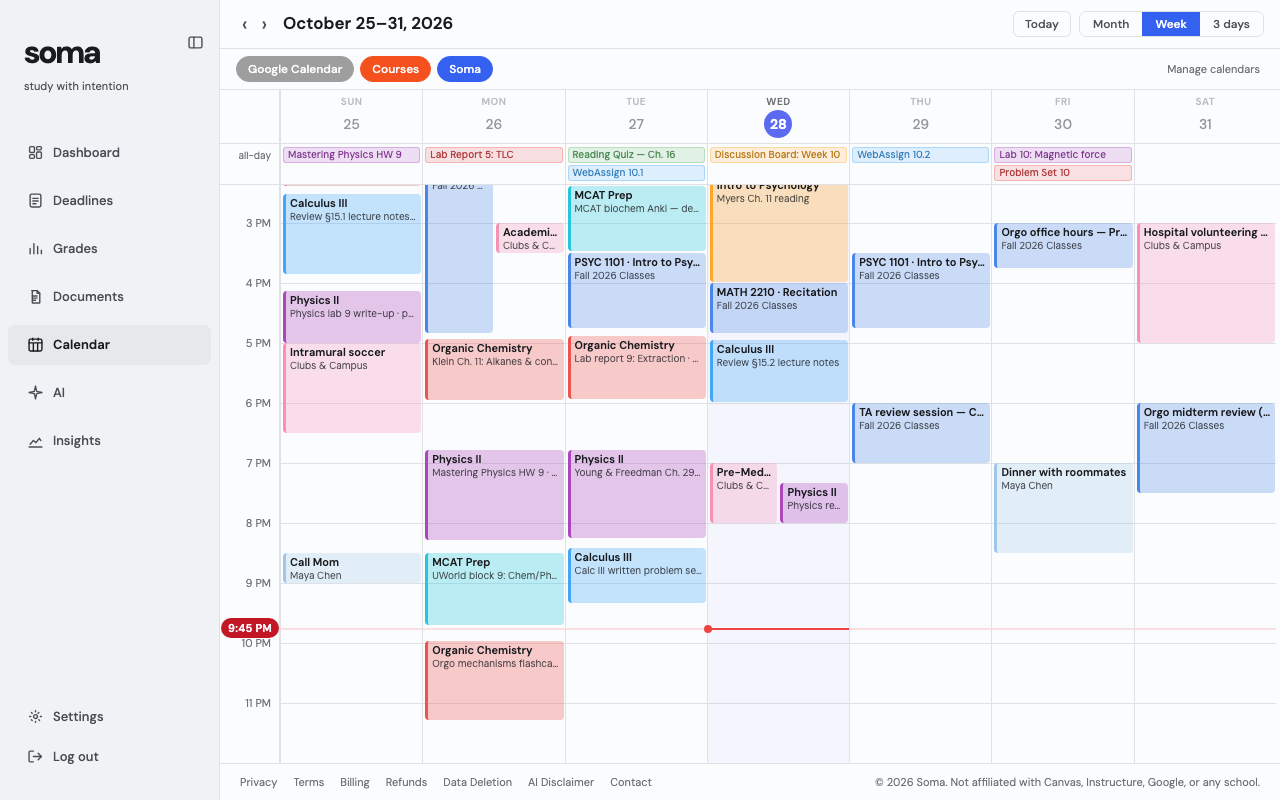
Good for: anyone tired of juggling five tabs to figure out what's next. Free to use; Premium adds the AI planner for $10.99 a month.
Less good for: phone-first students, for now (it's a web app plus a Chrome extension).
3. Shovel: best for planning when to do the work
Shovel turns due dates into work dates. Sync from Canvas (or upload a syllabus), estimate each task, and it places the work in your free time. Its "Cushion" warns you when you have more work than hours.
Good for: students who start things too late.
Less good for: your budget: it's paid after a 7-day trial, unless your school covers it.
4. Power Planner: best for grades and GPA
A simple homework planner for iPhone, Android and Windows whose real strength is grades: weighted grades, GPA across semesters, and a "what if" mode. It's free, with a small one-time upgrade.
Good for: tracking grades without a monthly fee.
Less good for: planning your time; it doesn't build a schedule. (Doing the math by hand? Here's how to calculate a weighted grade.)
5. Notion: best for building your own system
Not a planner but a blank canvas, with thousands of student templates. It's free for college students with a school email, and Notion Calendar shows tasks next to your events.
Good for: people who enjoy setting up systems.
Less good for: busy weeks: nothing comes in from Canvas, so every deadline is typed by hand.
6. Motion: best for hands-off AI scheduling
Add tasks with deadlines and Motion schedules them around your events, rescheduling when things move. It has grown into a work-management tool for teams.
Good for: very packed schedules that need to rearrange themselves.
Less good for: student budgets: it's paid only, priced for professionals, and doesn't know Canvas.
7. Reclaim.ai: best for protecting study time
Reclaim lives in your Google or Outlook calendar and defends time for habits like "study 2 hours a day." There's a free plan; paid plans start around $10 a month.
Good for: students who already run their week from Google Calendar.
Less good for: semester planning: the free plan only looks a week ahead, and it's built for work, not school.
8. Google Calendar: the free baseline
Subscribe to your Canvas calendar feed (here's how), add your classes, and block study time by hand.
Good for: everyone, as a starting point.
Less good for: planning: due dates show as all-day markers, the feed can lag by hours, and the scheduling is all on you.
So which one should you pick?
- Want something free that just works? MyStudyLife.
- Want everything in one place, with a plan that adapts to you? Soma.
- Your problem is starting too late? Shovel.
- Mostly care about your GPA? Power Planner.
- Love building systems? Notion.
- Already run your life from your calendar? Reclaim, or Motion if budget isn't an issue.
Whatever you pick, the habit matters most: collect every deadline, plan the week, and look back at where your time went. Here's how to make a study schedule you'll actually follow.